Smart Locks
Best Smart Lock for Vacation Rental (2026): Our 3 Picks Ranked
 By Laura Benning · Updated · How we pick
As an Amazon Associate I earn from qualifying purchases. Specs below come from each product's Amazon listing; we do not test products in person.
For a vacation rental, the Yale Assure Lock 2 leads this list: it gives every guest a code that expires at checkout, and DoorSense plus auto-lock secures the door behind them. The Philips adds fingerprint entry and up to 100 passcodes, while the Sifely adds a lever handle and RFID fobs.
Starting out? See the main guide: Best Smart Lock
Top picks at a glance
-
 Best OverallYale Assure Lock 2 Extended Range WiFi9.8 View on Amazon
-
 9.3 View on Amazon
-
 9.2 View on Amazon
Compare the specs
Ranked on fingerprint reader, keypad, auto-lock, phone app control, works with alexa / google from each listing, plus how many buyers have rated it. A dash (—) means we could not confirm that figure from the listing.
| Pick | Fingerprint reader | Keypad | Auto-lock | Phone app control | Works with Alexa / Google | Weight | Warranty |
|---|---|---|---|---|---|---|---|
| 1. Yale Assure Lock 2 Extended Range WiFi | — | Yes | Yes | Yes | — | — | — |
| 2. Philips Wi-Fi Smart Lock for Front Door | Yes | Yes | Yes | Yes | Yes | — | — |
| 3. Sifely Electronic Fingerprint Smart Lock with Handle | Yes | Yes | Yes | Yes | — | 6 lb | 1-year |
Yale Assure Lock 2 Extended Range WiFi
It pairs expiring guest codes with DoorSense and auto-lock, plus remote control through the Yale Access app.
- Keypad
- Auto-lock
- Phone app control
Good for
- Rental owners who want guest codes that expire at checkout
- Owners who want DoorSense and auto-lock on a deadbolt
Skip it if
- You want built-in Wi-Fi with no separate bridge
- Your door faces temperatures below minus 22 degrees
The included Wi-Fi Bridge connects to a 2.4 or 5 GHz network and extends battery life and range, so the lock itself stays off Wi-Fi. The Yale Access app locks and unlocks the door and sends alerts, and codes can be scheduled, shared or revoked in seconds. DoorSense checks that the door is fully closed before auto-lock runs. It is Grade 2 certified by BHMA and rated from minus 22 degrees to 140 degrees Fahrenheit, with low-power alerts and a backup key.
Philips Wi-Fi Smart Lock for Front Door
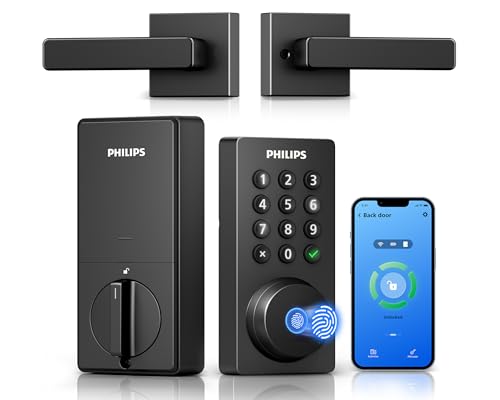
It offers fingerprint entry, up to 100 passcodes and built-in Wi-Fi with voice control through Alexa or Google.
- Fingerprint reader
- Keypad
- Auto-lock
- Phone app control
- Works with Alexa / Google
Good for
- Rental owners who want up to 100 passcodes for guests
- Buyers who want fingerprint entry plus voice control
Skip it if
- You need more than 100 passcodes for guests
- You want an auto-lock delay longer than 180 seconds
The fingerprint sensor sits on top of the panel on a 7.17-degree angled surface and stores up to 50 fingerprints. Entry runs through fingerprint, PIN code, the Philips Home Access app, voice commands through Alexa or Google, or a traditional key. Built-in Wi-Fi connects directly to a 2.4 GHz network, and the app shows an activity log of when the door was used. The auto-lock timer sets from 10 to 180 seconds, and the lock takes 8 AA 1.5V alkaline batteries, not included.
Sifely Electronic Fingerprint Smart Lock with Handle
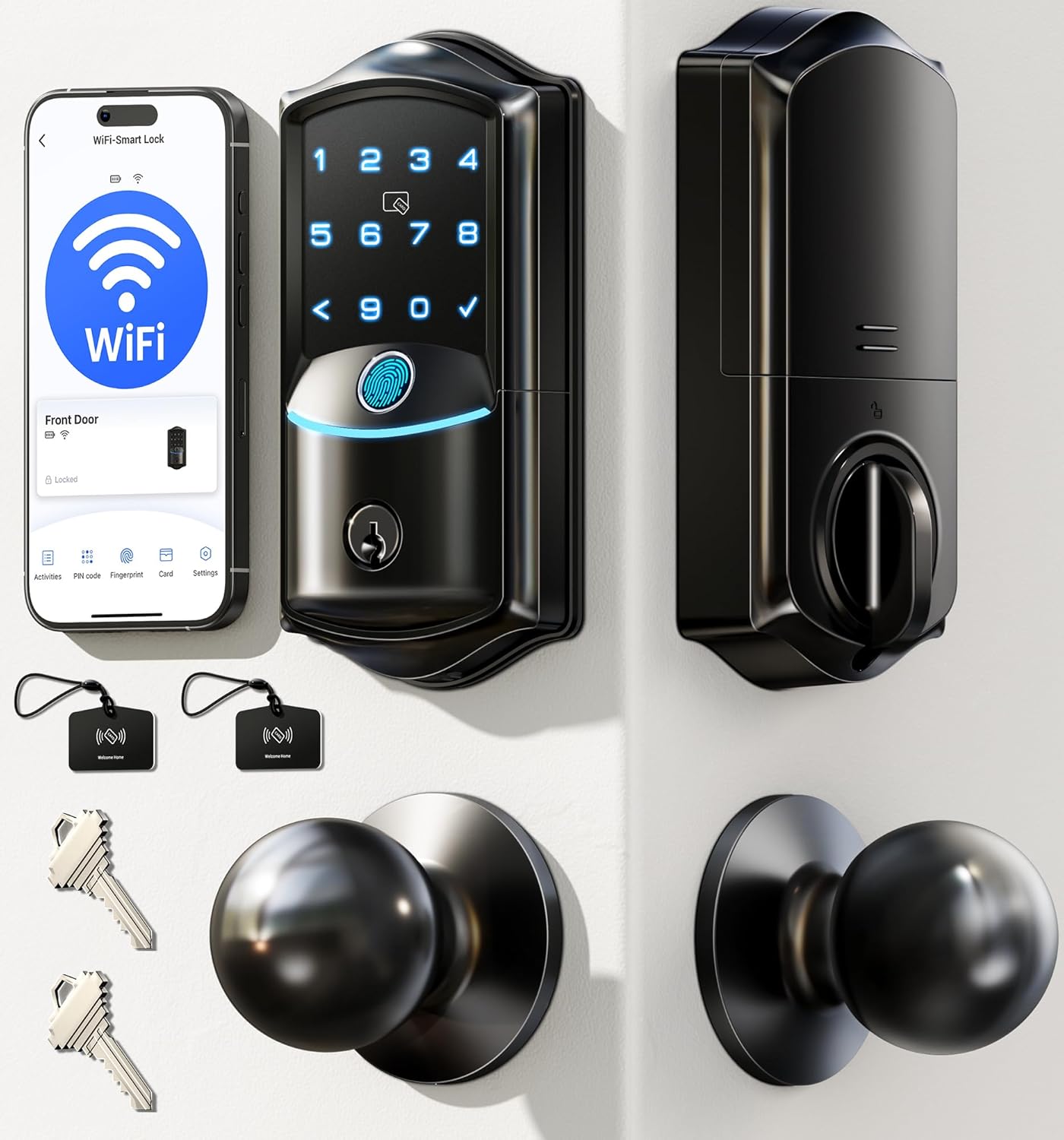
It combines fingerprint entry, a lever handle and time-limited codes, with Bluetooth app control in range.
- Fingerprint reader
- Keypad
- Auto-lock
- Phone app control
- 1-year warranty stated
Good for
- Rental owners who want time-limited codes and a handle
- Buyers who want fingerprint entry and an RFID key fob
Skip it if
- You want a warranty longer than 1 year
- You want remote control without a separate gateway
Five entry methods cover fingerprint, keypad PIN, Bluetooth app, RFID key fob and backup mechanical key. The keypad supports anti-peeping PIN entry, and codes can be permanent, timed, one-time or recurring. The Sifely app works within Bluetooth range to manage users and eKeys and sync entry records, while remote internet control needs a Wi-Fi Gateway sold separately. The zinc alloy body has a reversible lever handle, IP65-rated protection and a 6 lb weight, and it runs on four AA batteries with a micro-USB emergency power port.
How to choose
Guest codes that expire at checkout
A vacation rental lock should give each stay its own code and end that code at checkout, so no spare key changes hands between guests. The Yale gives guest entry that expires at checkout and lets codes be scheduled, shared or revoked in seconds. The Philips sets permanent, recurring, date-range or offline one-time codes, and the Sifely creates permanent, timed, one-time or recurring codes for visitors, cleaners or rental guests.
Remote control and Wi-Fi setup
Remote locking matters when a guest is locked out or a cleaner needs entry between stays, and the three picks reach remote control in different ways. The Yale uses an included Wi-Fi Bridge on a 2.4 or 5 GHz network, and the Philips connects directly to 2.4 GHz Wi-Fi with no hub or bridge. The Sifely works by Bluetooth within range, and remote internet control needs a Wi-Fi Gateway sold separately.
Auto-lock and door fit
Auto-lock closes the gap when a guest leaves without locking up, and each pick handles it in its own way. Before buying, check the door dimensions against the figures the Philips and the Sifely give for cross bore, backset and thickness.
FAQ
How do I give each vacation rental guest a code?
Use a lock with expiring codes. The Yale gives guest entry that expires at checkout, the Philips sets date-range or offline one-time codes, and the Sifely creates timed or one-time codes for rental guests.
Can I lock and unlock the door from anywhere?
The Yale controls the door through the Yale Access app with its included Wi-Fi Bridge, and the Philips connects directly to 2.4 GHz Wi-Fi for remote control in its app. The Sifely needs a Wi-Fi Gateway sold separately for remote internet control.
What if a guest leaves without locking the door?
All three picks have auto-lock. The Yale uses DoorSense to check the door is fully closed before auto-lock runs, the Philips lets you set auto-lock from 10 to 180 seconds in the app, and the Sifely offers auto lock with passage and privacy modes.
Do these locks need a hub or bridge?
The Philips has built-in Wi-Fi and connects directly to a 2.4 GHz network. The Yale includes a Wi-Fi Bridge, and the Sifely uses Bluetooth in range unless a Wi-Fi Gateway is added.